
Ram Parasitic Drain Troubleshooting: 10 Fixes That Actually Work
If your Ram truck is killing batteries overnight, you are dealing with a classic case of parasitic drain. Ram parasitic drain troubleshooting is one of the most frustrating things a Ram owner can face, but the good news is it is almost always fixable once you know where to look.
What Is Parasitic Battery Drain on a Ram Truck?
Parasitic drain happens when something in your truck keeps pulling power from the battery even after you turn the engine off. Unlike a normal key-off draw (every vehicle has a small one), excessive parasitic drain will leave you stranded with a dead battery in hours or days.
On Ram 1500 and Ram 2500 trucks, the acceptable key-off draw is typically under 50 milliamps. Anything above that is a red flag worth chasing down.
Common Symptoms of Parasitic Drain on Ram Trucks
Before you start pulling fuses, make sure you are actually dealing with parasitic drain. Here are the dead giveaways:
- Dead battery after sitting overnight or for a few days
- Battery warning light on the dashboard
- Truck needs a jump-start regularly but the alternator tests fine
- Electrical gremlins like flickering lights or random module resets
- Battery drains faster in cold weather than it should
If two or more of these symptoms describe your truck, you almost certainly have a parasitic draw problem.
What You Need Before You Start Ram Parasitic Drain Troubleshooting
You do not need a full shop to track this down. Here is the basic toolkit:
- Digital multimeter (with a 10-amp and milliamp setting)
- Fuse puller
- Your Ram’s fuse box diagram (in the owner’s manual or inside the fuse box lid)
- A helper or a fused test light (optional but speeds things up)
- Patience (seriously, this one matters)
Having the right tools cuts your diagnostic time in half.
Step-by-Step Ram Parasitic Drain Troubleshooting Process
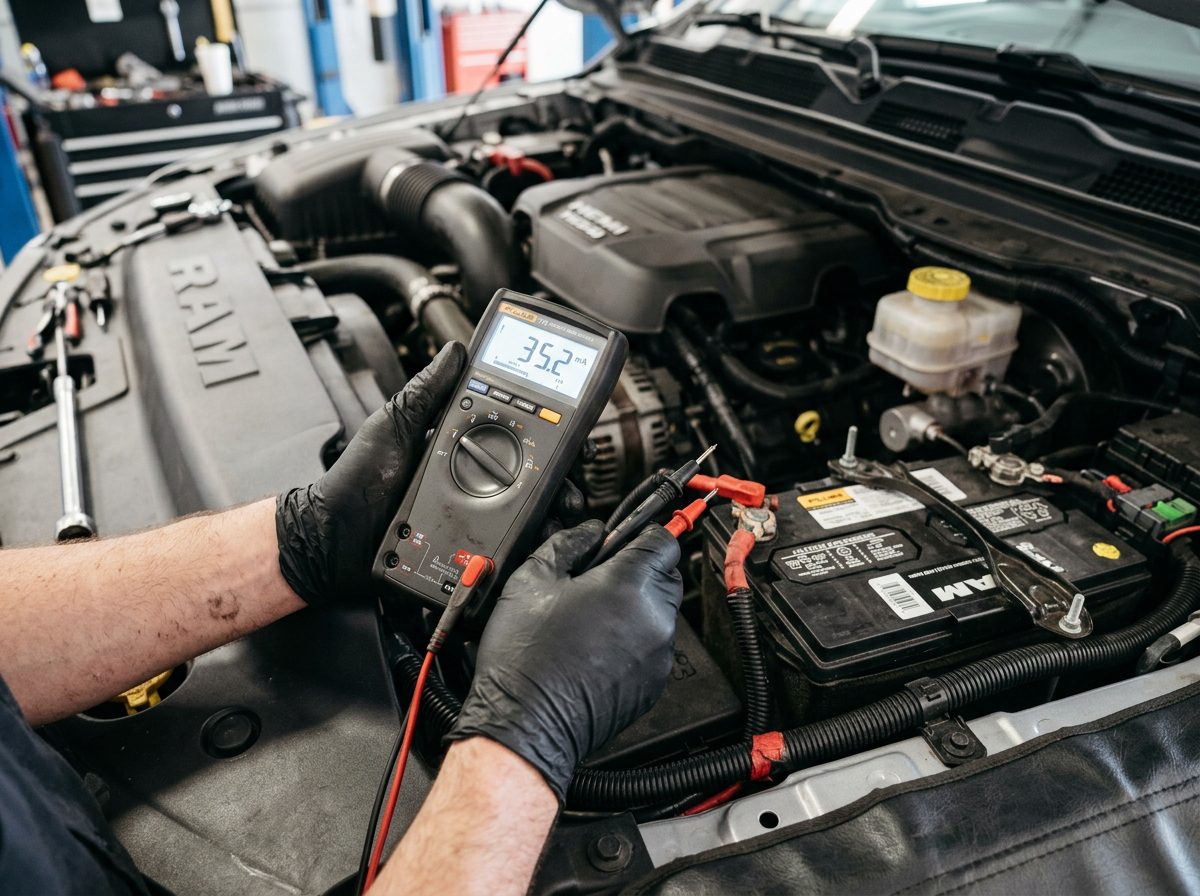
Step 1 – Set Your Multimeter to DC Milliamps
Set your multimeter to the 10-amp DC setting first to avoid blowing the meter’s fuse. Connect the positive lead to the positive battery terminal and the negative lead to the battery cable (not the terminal).
You are now reading the total key-off draw of the entire truck. Write it down.
Step 2 – Let the Truck “Go to Sleep”
This is the step most people skip, and it costs them hours of confusion. Modern Ram trucks have multiple modules that stay active for 15 to 45 minutes after you turn off the ignition.
Wait at least 30 minutes before reading your draw. If you do not wait, you will see falsely high numbers from modules that are still awake.
Step 3 – Pull Fuses One at a Time
With your meter still in the circuit, start pulling fuses one at a time from the fuse box. When your milliamp reading drops significantly, you have found the circuit causing the drain.
Pro tip: Start with these high-suspect circuits on Ram trucks:
- Body Control Module (BCM) fuse
- Radio and infotainment fuse
- Trailer brake controller fuse
- Amplifier or Uconnect fuse
- TIPM (Totally Integrated Power Module) fuses
Step 4 – Narrow It Down to a Component
Once you know which circuit is draining, trace it back to the individual component. A wiring diagram for your specific Ram model year is extremely helpful here.
Common culprits on Ram trucks include a stuck relay inside the TIPM, a shorted aftermarket accessory, or a module that will not power down correctly.
Step 5 – Test the Battery and Alternator Too
A battery that is sulfated or has a bad cell can mimic parasitic drain symptoms. Before spending hours chasing wiring, have your battery load-tested and your alternator output checked.
A bad battery can show 12.6 volts but fail completely under load. Do not skip this step.
Top 10 Causes of Parasitic Drain on Ram Trucks
Here is the full list of the most common culprits, ranked by how often they show up in Ram forums and owner complaints:
1. TIPM (Totally Integrated Power Module) Failure
The TIPM is the brain of your Ram’s electrical system, and it is notorious for causing parasitic drain issues. A failing TIPM can keep relays energized all night long, draining your battery fast.
Symptoms: Random electrical issues, fuel pump running after key-off, accessories staying on. This is one of the most expensive fixes, so confirm it before replacing.
2. Aftermarket Accessories Left Wired Directly to Battery
Aftermarket stereos, light bars, winches, and dash cams wired directly to the battery without a proper relay or switched power source are a leading cause of parasitic drain. They draw power 24/7, even when the truck is parked.
Fix: Rewire accessories to a switched ignition source or add a relay so they cut power with the key.
3. Trunk and Cab Lights Staying On
A dome light, bed light, or glovebox light that sticks on due to a faulty door pin switch will drain your battery fast. This one is easy to overlook because the light might only be on slightly.
Check: Open every door, the tailgate, and the hood at night and look for any light that stays on longer than it should.
4. Uconnect or Infotainment System Not Powering Down
The Uconnect system in newer Ram trucks sometimes fails to enter sleep mode properly. This keeps the infotainment system and its associated modules drawing power around the clock.
Symptom: The screen might stay lit faintly, or you may notice the system waking up randomly. A software update from the dealer often fixes this.
5. Trailer Brake Controller Draw
Even with nothing plugged into the trailer hitch, a factory or aftermarket trailer brake controller can cause a parasitic drain on Ram trucks. The 7-pin connector itself can sometimes be the issue if it has corrosion or a damaged pin.
Fix: Unplug any trailer wiring from the hitch and see if your draw drops. If it does, inspect the connector and the controller.
6. Amplifier or Audio System Left Awake
If your Ram has an upgraded audio system with an aftermarket amplifier, a bad remote turn-on wire connection can keep the amp powered all the time. Amplifiers draw significant current even in standby mode.
Fix: Check that the amp’s remote turn-on wire is properly connected to a switched power source, not a constant 12-volt source.
7. GPS Tracker or Fleet Device
If you bought a used Ram or had fleet use, there may be a GPS tracker or telematics device still wired and drawing power. These devices are often hidden under the dash or seats.
Check the fuse that dropped during your pull test and trace the wire for unfamiliar devices.
8. Faulty BCM (Body Control Module)
The Body Control Module manages a huge range of functions in your Ram, and a failing BCM can refuse to go into sleep mode. When that happens, it keeps dozens of other modules awake too, creating a significant drain.
Diagnosis: This usually requires a dealer-level scan tool like wiTECH to check module sleep activity.
9. Power Running Board Motor
Ram trucks with power-deploying running boards have motors and control modules that can occasionally fail to park correctly and stay drawing power. This is a less common but real source of drain.
Quick check: Disconnect the running board harness at night and see if your drain drops.
10. A Weak or Failing Battery
This is the simplest answer and is sometimes overlooked. A battery that is 4 or more years old may not hold a full charge overnight even with no abnormal draw. Cold weather accelerates this problem significantly.
Get your battery load-tested at any auto parts store before spending time on wiring diagnostics.
Ram Parasitic Drain Troubleshooting by Model Year
Not all Ram trucks drain for the same reason. Here is a quick breakdown by generation:
2009-2012 Ram 1500 (4th Gen)
TIPM failures are extremely common on this generation. The TIPM can keep the fuel pump running or keep relay-controlled circuits powered after the truck is off. If you own one of these trucks, check the TIPM first.
These are still solid trucks overall. For a deeper look at which years to target, check out this guide on the best years for Ram 1500.
2013-2018 Ram 1500 (5th Gen)
This generation sees more Uconnect-related drain issues. Software updates from FCA addressed some of these, but older units that were never updated can still have the problem. The trailer brake controller circuit is also a common culprit here.
If you are shopping for a reliable used truck in this range, this Ram 1500 year guide to the most reliable models and years to avoid is a great starting point.
2019-Present Ram 1500 (6th Gen / DT)
The eTorque mild hybrid system on the 2019+ Ram 1500 adds complexity to the electrical system. Parasitic drain on these trucks can be trickier to diagnose because the 48-volt mild hybrid battery system interacts with the main 12-volt system. Dealer diagnostics are often required on this generation for accurate results.
For anyone considering a new truck purchase, the 2026 Ram buying guide with honest owner review tips covers the latest generation in depth.
How to Fix Ram Parasitic Drain: Quick Reference Table
Issue | DIY Fix | Dealer Needed? TIPM failure | Replace TIPM or send for rebuild | Recommended Aftermarket accessory drain | Rewire to switched source | No Uconnect not sleeping | Software update | Yes Trailer brake controller | Inspect connector, replace if needed | No Weak battery | Replace battery | No BCM not sleeping | Module reset or replace | Yes Dome or cargo light stuck on | Replace door pin switch | No
How to Prevent Parasitic Battery Drain on Ram Trucks
Once you fix the drain, here is how to keep it from coming back:
- Use a battery maintainer (trickle charger) if the truck sits for more than a week
- Keep your Ram’s software updated through the dealer to fix known module sleep bugs
- Test your battery every fall before cold weather hits
- Wire any new accessories through a relay and switched power
- Inspect your trailer connector annually for corrosion
Good preventive habits will save you from ever dealing with this problem again.
When to See a Dealer for Ram Parasitic Drain
DIY diagnostics will take you far, but some situations call for professional help:
- You cannot find the drain after pulling every fuse
- The drain comes and goes randomly
- Your truck is still under warranty
- The TIPM or BCM is suspected
- You see error codes related to module communication
A dealer with the wiTECH diagnostic tool can read module sleep activity in real time, which is something a basic multimeter cannot do. It is worth the diagnostic fee if you have exhausted your other options.
Best Ram Trucks to Own if You Want Fewer Electrical Issues
Electrical problems are not uniform across all Ram generations. Some model years are significantly more reliable than others. Doing your homework before buying a used Ram is the best way to avoid inheriting a parasitic drain problem.
For Ram 1500 trucks that are known for long-term reliability and fewer electrical gremlins, check out this resource on the best year for Ram 1500. And if you want to dial in your truck for performance and durability, this Ram 1500 trucks tire guide covers all-terrain, highway, and winter tire testing to help you get the most out of your rig.
Conclusion
Ram parasitic drain troubleshooting does not have to be a nightmare. With a multimeter, the right fuse-pull method, and a little patience, most Ram owners can find and fix the drain without ever visiting a shop.
Start with the basics: check the battery, wait for the modules to sleep, and pull fuses one circuit at a time. Whether the problem is a failing TIPM, a sticky dome light, or an aftermarket accessory wired wrong, the fix is almost always within reach.
Stay on top of your truck’s electrical health, and your Ram will reward you with reliable starts every single time.
Frequently Asked Questions About Ram Parasitic Drain Troubleshooting
How much parasitic drain is normal on a Ram truck?
Most Ram trucks have a normal key-off draw of 25 to 50 milliamps once all modules have gone to sleep. Anything consistently above 50 milliamps is worth investigating.
How long should I wait before measuring key-off draw on a Ram?
Wait at least 30 minutes after turning off the ignition. Some Ram modules, especially Uconnect and the BCM, can take up to 45 minutes to fully enter sleep mode.
Can a bad ground cause parasitic drain on a Ram truck?
Yes. A corroded or loose ground connection can cause modules to behave erratically and refuse to power down properly. Check your battery ground cable and chassis ground connections as part of your diagnosis.
Will a parasitic drain eventually kill my alternator?
Not directly, but it forces your alternator to work harder on every drive to recharge a depleted battery. Over time, this can shorten alternator life and stress your charging system. Fix the drain sooner rather than later.
Is parasitic drain covered under Ram’s warranty?
If your truck is still within the 3-year/36,000-mile basic warranty, electrical parasitic drain caused by a factory component or module is typically covered. Aftermarket-caused drain is not. Check with your dealer for your specific situation.
What is the most common cause of parasitic drain on Ram 1500 trucks?
TIPM failure is the most discussed cause among Ram 1500 owners, especially on 2009-2012 models. On newer trucks, Uconnect module sleep issues and improperly wired aftermarket accessories are the most frequent culprits.
Ram parasitic drain troubleshooting is a solvable problem with the right approach. Use this guide as your step-by-step roadmap and get your truck starting reliably again.




0 Comments